Android · iPhone · Browser
Playing Uncrossable Rush on a phone without a store app
By Uncrossable Rush SlotIn editorial deskPublished Updated
There is no standalone Uncrossable Rush app from Evoplay on Google Play or the App Store; the HTML5 game runs in your mobile browser or inside a gaming operator’s app. An Uncrossable Rush APK shared through Telegram, YouTube or an unknown site is a third-party file, not the game’s required download. You can use a browser shortcut instead.
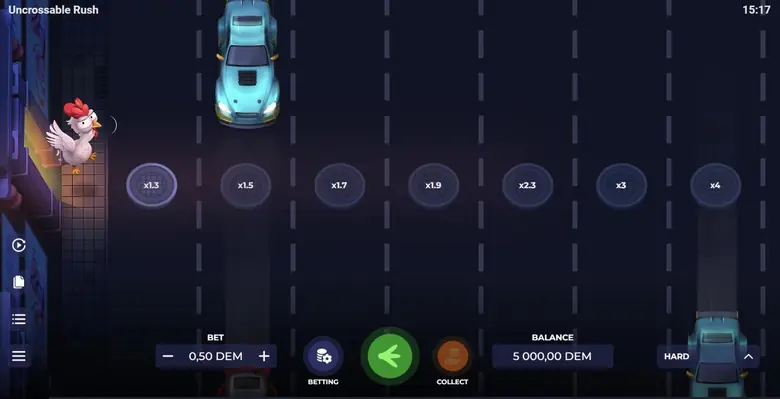
The same HTML5 game a phone browser shows; tap Play to load it, no download. 18+.
01 · Mobile
Is there an Uncrossable Rush app?
Separate the game from the app
No standalone Uncrossable Rush app from Evoplay is listed on Google Play or the App Store. The game is made by Evoplay and runs as HTML5 on a mobile browser. A gaming operator may also offer the game inside its own app, but that operator app is a separate product. The operator handles its own registration and account; there is no separate Uncrossable Rush account.
An APK is an Android installation file, not a different name for the game. The mobile browser is the software that opens a web page, while a home-screen shortcut is a link to that page. These distinctions matter when you search for “Uncrossable Rush app download” or “Uncrossable Rush mobile”: a browser session or operator app is not an Evoplay app download. For a quick overview of the app question, see our Uncrossable Rush app guide.
02 · Mobile
Compare the ways to access Uncrossable Rush
What each option gives you
The browser is the most direct way to open the HTML5 game page, where available. An operator app may also show Evoplay games, but the operator controls access. A shortcut opens a saved page; it does not install a native game. Use this comparison to identify what you are being offered before tapping a download button.
| Option | Where it comes from | What you get | Risk or limitation |
|---|---|---|---|
| Uncrossable Rush game | Evoplay game supplied through a gaming operator | The chicken road-crossing game, with 24 lanes | Access depends on the operator and region |
| Operator app | The gaming operator | Its own account and game catalogue, which may include Uncrossable Rush | The operator, not Evoplay, controls the app and account |
| APK file | An Android file shared or hosted by a third party | An app installation file claiming to provide the game | It is not an Evoplay Uncrossable Rush APK; its contents and permissions need scrutiny |
| Mobile browser | A browser on Android or iPhone | The HTML5 game page, if it loads | Demo access can depend on location and the page may not open everywhere |
| Home-screen shortcut | A page saved from Chrome or Safari | A quick way to reopen the browser page | It is a shortcut, not a standalone app or offline game |
If the page does not load, that does not mean you need an APK.The demo page explains the browser route, while where to play covers the operator distinction.
03 · Mobile
Play the Uncrossable Rush demo on a phone
Follow the game controls
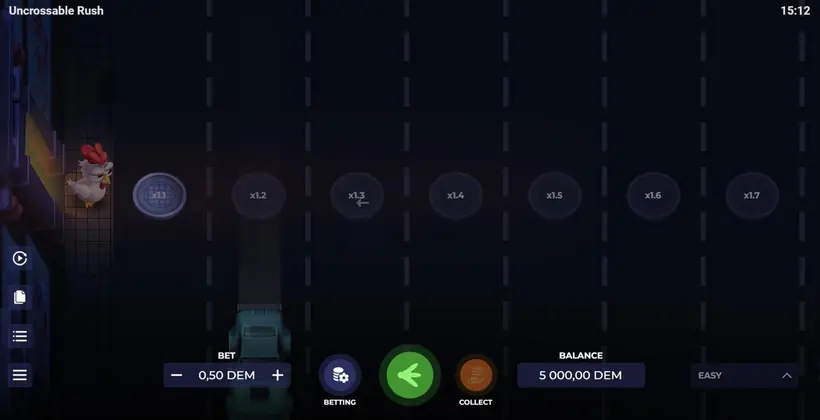
You can try the demo in a phone browser when the demo page is available to you. It uses demo credits, not cash: our demo test on 2 November 2026 showed a balance of 5,000.00 DEM and a default bet of 0.50 DEM. DEM credits have no cash value. The test was on a desktop browser, so the phone steps below describe the game’s stated controls rather than a separate mobile test.
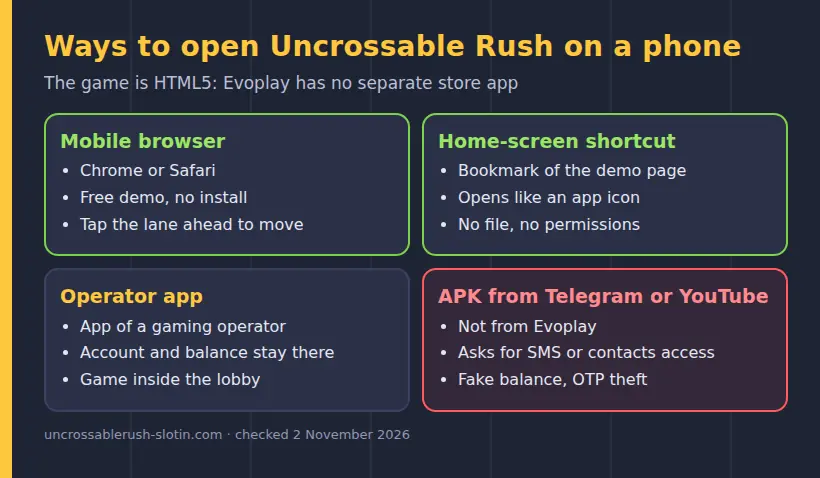
- Open the demo page in your mobile browser and tap to load the game. If it is unavailable in your region, do not treat an APK download as a required fix.
- Choose a difficulty from Easy, Medium, Hard or Hardcore, set the DEM bet and press the green Play arrow. Each difficulty has 24 lanes; higher levels bring more cars and higher collision risk.
- Tap the lane immediately in front of Eggwina to move forward. If swipe mode is active, swipe to scroll the field. Each successful step raises the multiplier for that round.
- After a safe step, press the orange Collect button to cash out the displayed demo amount, or continue to another lane. If a car hits the chicken, the round is lost; reaching the road’s end pays the last multiplier.
The demo test gives a concrete example: on Hard with a 0.50 DEM bet, three safe steps reached x1.7. Collect displayed 0.85 DEM, calculated as 0.50 × 1.7. In two other test rounds, the chicken was hit on the first lane and after the x1.3 lane. These outcomes are examples, not a prediction of future rounds. Find more controls in how to play and the multiplier guide.
04 · Mobile
Add the demo page to your home screen
Android Chrome and iPhone Safari
A home-screen shortcut can make the page easier to reopen, but it does not turn Uncrossable Rush into a native app. First open the demo page in the relevant browser. Save the page only after it has loaded, and remember that the shortcut still relies on the browser and an available game page.
- On Android, open the page in Chrome, tap the browser menu and choose the option to add the page to your home screen. Confirm the shortcut name when prompted.
- On iPhone, open the page in Safari, tap the Share button and select Add to Home Screen. Confirm the displayed name and add the shortcut.
- Tap the new home-screen icon to reopen the page. If it opens a browser tab or the game page is unavailable, that is normal: the shortcut is a saved link, not an installed Uncrossable Rush app.
Do not confuse a shortcut with an APK download. You have not installed a separate game file by following these steps, and the shortcut does not create an Uncrossable Rush account. If you want to compare app claims with the browser option, see how to spot real or fake app claims.
05 · Mobile
Check an Uncrossable Rush APK before installing
Review the source, permissions and warning
An Uncrossable Rush APK download from Telegram, YouTube or an unknown website is a third-party file. Evoplay’s game runs in a browser or inside an operator app; an APK promoted under the game’s name is not evidence of a separate Evoplay release. The developer’s game page is at evoplay.games/game/uncrossable-rush.
If you have already received an APK, use these checks before opening it:
- Check who published and hosts the file. A Telegram post, YouTube description or unfamiliar download page is not an Evoplay source. Do not rely on a logo or game name as proof of origin.
- Review the permissions requested by the file. Permissions that do not make sense for a game page are a reason to stop rather than approve them.
- Pay attention to a Google Play Protect warning. Do not dismiss or work around a warning just to install the file.
- Keep Android’s install-from-unknown-sources setting switched off. If you changed it while inspecting an APK, switch it off again afterwards; avoid leaving permission for unknown sources enabled.
An APK can request access beyond what a browser game needs, and a file from an unknown source may not be the game it claims to be. The safer distinction is simple: use the browser page or an operator app you already know how to identify, rather than treating an APK as necessary for mobile play.
06 · Mobile
Check Uncrossable Rush version and mod claims
What the version details do and do not say
The Evoplay demo showed game version 0.95.0 on 2 November 2026, and the in-game Rules screen was dated 05.03.2024. Those details identify what appeared in that demo; they do not establish a separate latest APK version. Evoplay’s game page lists the release as June 2025. The game is in the Instant Games category and has no reels or paylines, despite searches that call it a slot or crash game.
Claims of a “latest Uncrossable Rush APK”, modded file or altered game should not be treated as Evoplay updates. The game can be supplied through an operator, and the operator can run only versions offered by the provider. The Rules screen at that operator is where its available version details and game rules appear. Avoid entering login or payment details into a page promoted as a version update.
The game has four difficulty settings: Easy, Medium, Hard and Hardcore. Their highest listed multipliers are x24, x2,500, x5,000 and x10,000 respectively. These are paytable figures, not a promise of a result. You can compare the levels in our multiplier guide before starting a demo round.
07 · Mobile
Avoid Uncrossable Rush predictor and signal apps
Why predictions cannot tell you the next lane
Predictor, hack and signal apps do not work for Uncrossable Rush. Each step is decided by Evoplay’s random number generator, and outcomes are random and equally likely for all positions. A signal claiming it can identify a safe lane or forecast a car does not change the game’s next outcome.
The game includes a provably fair check: a round has a validation string in History, and the hash can be compared using a SHA-256 hash generator. This checks the round hash against its validation string; it is not a tool for predicting a future round. Do not share account credentials, install another APK or pay for a signal service on the claim that it can beat the random number generator.
If you want to understand the round rather than follow a prediction, use the in-game Rules and Paytable. After a successful step you can Collect or continue, and a collision ends that round. The button choice does not make the next lane certain. For more background on the game itself, see our review.
08 · Mobile
Remove a suspicious Uncrossable Rush file
Act quickly if you installed an unknown APK
If you installed a suspicious file, uninstall it and protect any accounts or payment details you used on the device. Do not open the file again to check whether it works. Use a clean device or browser for account changes if you suspect the phone may be affected.
- Uninstall the suspicious app from Android settings. Then check the install-from-unknown-sources setting and switch it off if it was enabled.
- Change passwords for accounts you used on the device, starting with your email and any gaming account. Use a clean device or browser and do not reuse the old password.
- If you entered bank details or payment credentials, contact your bank promptly and explain that you installed a suspicious file. Ask the bank to secure the account and review activity.
- Run the device’s available security check, including Google Play Protect, and remove any other unfamiliar apps you find.
Uninstalling the file does not undo information already entered into it, so changing passwords and contacting the bank matter if you shared credentials or payment details. If no file was installed, there is no need to follow the uninstall steps; close the download page and keep unknown-source installation switched off.
09 · Mobile
Use the demo and know what this site provides
Keep the browser, operator and game separate
The demo is a way to learn the lane controls with demo credits. Real-money access, if shown by an operator, is separate from the demo and follows that operator’s account rules and game availability. The game itself has no bonus round, free spins or bonus symbols; any promotion is set by an operator under its own terms. The promo-code page explains why an operator offer is not an Evoplay game feature.
This site publishes guides to Uncrossable Rush for readers in India, including a demo that loads after a click. Buttons marked Play, Register or Get bonus lead through /go/ to a partner site, and the site may earn a commission. The editorial desk updates pages by playing the demo and reading the in-game Rules and Paytable. Contact the team at contact@uncrossablerush-slotin.com.
In India, paid play on Uncrossable Rush through any app or browser is prohibited under the 2025 Act in force since 1 May 2026.
FAQ
Phone, app and APK questions
Can I download the Uncrossable Rush app on Android?
No standalone Evoplay app is listed on Google Play; open the HTML5 game in a mobile browser or use an operator app that carries it.
Where can I get an Uncrossable Rush APK download?
Evoplay has no standalone Uncrossable Rush APK; files shared through Telegram, YouTube or unknown sites are third-party files, not required game downloads.
How do I play Uncrossable Rush on my phone?
Open the demo page in a mobile browser, choose a difficulty, tap the lane ahead of Eggwina, then Collect after a safe step.
Is there an Uncrossable Rush app for iOS?
No standalone Evoplay app is listed on the App Store; you can open the HTML5 game in Safari and add its page to your home screen.
Do Uncrossable Rush predictor or signal apps work?
No. The random number generator decides each step, so predictor, hack and signal apps cannot identify or predict the next safe lane.