Free · No login · DEM credits
Try Eggwina’s road crossing free before any bet
By Uncrossable Rush SlotIn editorial deskPublished Updated
The Uncrossable Rush demo on this page is free, needs no sign-up and starts with 5,000 DEM demo credits that have no cash value. It loads only after you press Play. You can use it to learn the controls, try the four difficulty levels and see how collecting works without placing a real-money stake.
Press Play to open the Evoplay demo: 5,000 DEM, default bet 0.50, no sign-up. 18+.
01 · Demo
Play the Uncrossable Rush demo
You can start a demo round from the intro screen by choosing a difficulty, setting a bet and making your move. The game is Evoplay’s road-crossing step game: Eggwina, a chicken, crosses a road with 24 lanes while cars approach at random. It has no reels or paylines, although people may search for it as a slot or crash game. Evoplay places it in its Instant Games category. Its developer page describes the game; the operator is a separate service that may offer it.
Start from the intro screen
The intro says “Choose difficulty / Place a bet and make your move” and “Play It Smart: Cash Out or Continue”. It also displays “Up to x10000 multiplier” and a “Don’t show next time” tick box. Follow these steps:
- Press Play to load the demo. The game does not start before this click.
- Choose Easy, Medium, Hard or Hardcore from the difficulty dropdown.
- Set your bet in DEM using the BET field or Bet Settings.
- Press the green Play arrow. Eggwina steps onto the first lane.
- After a safe step, choose COLLECT to take the displayed return or continue to another lane.
Each successful step raises the multiplier. A car hit ends the round and loses that round’s bet; reaching the final lane pays the last multiplier. You can also tap a lane ahead of Eggwina to move, while swipe mode scrolls the field. The how-to-play guide explains the round flow in more detail.
Understand the first move
The intro is an instruction screen, not a live round. Once you close it or continue, the selected difficulty and bet apply to the next round. If the screen is unfamiliar, begin with a small demo bet and use one step at a time so you can identify the Play and COLLECT controls before trying additional moves.
02 · Demo
Check the Uncrossable Rush interface
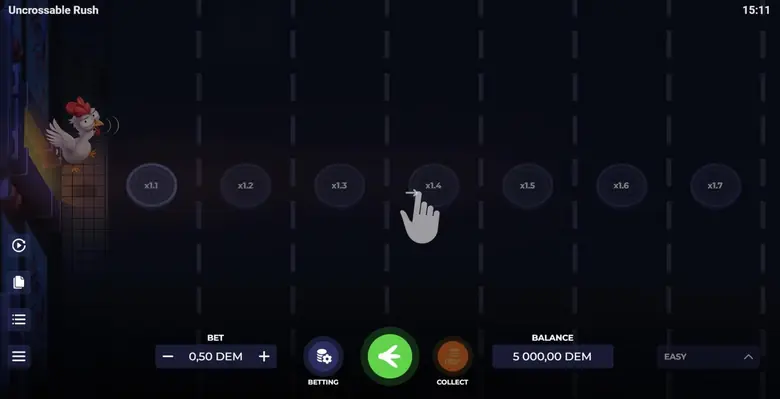
The central board shows Eggwina, lanes and cars; the controls around it let you set a stake, choose a level and decide when to collect. These labels and functions were visible in our demo test:
Main controls
| Element | What it does |
|---|---|
| BET field with minus and plus | Shows the current bet; use the buttons to reduce or increase it. |
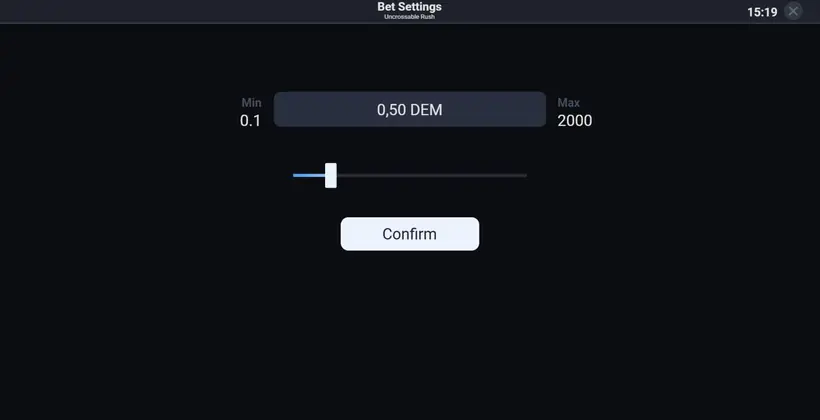
| BETTING | Opens Bet Settings, where a slider adjusts the amount and Confirm applies it. |
| Green Play arrow | Starts a round with the selected bet and difficulty. |
| COLLECT | Cashes out the amount shown after a successful step. |
| BALANCE | Displays the remaining demo credits. |
| Difficulty dropdown | Selects Easy, Medium, Hard or Hardcore. |
Sidebar and menu
The left sidebar contains autoplay, hash, history and menu. Autoplay opens the automated-round settings. Hash copies the validation string for a round, while History stores round records and their validation strings. Menu opens sound, fullscreen, rules, paytable and settings. These are game controls; an operator’s account, cashier and app are separate. For the multiplier progression, see the levels and multipliers guide.
03 · Demo
Check demo credits and bet limits
The demo began with 5,000.00 DEM, and its default bet was 0.50 DEM. Bet Settings showed a minimum of 0.1 DEM and a maximum of 2,000 DEM. The in-game Rules screen gives the same limits as 0,10 DEM and 2 000,00 DEM. These are demo values, not rupee limits or a promise about the limits an operator sets for another version.
To change the amount, press BETTING, move the Bet Settings slider, then select Confirm. You can also adjust the BET field with its minus and plus controls. The chosen amount appears before you start; BALANCE changes as rounds end. Demo credits have no cash value, so a displayed balance is not money in an operator account. Check the game review for more about the rules and paytable.
04 · Demo
See our Uncrossable Rush test rounds
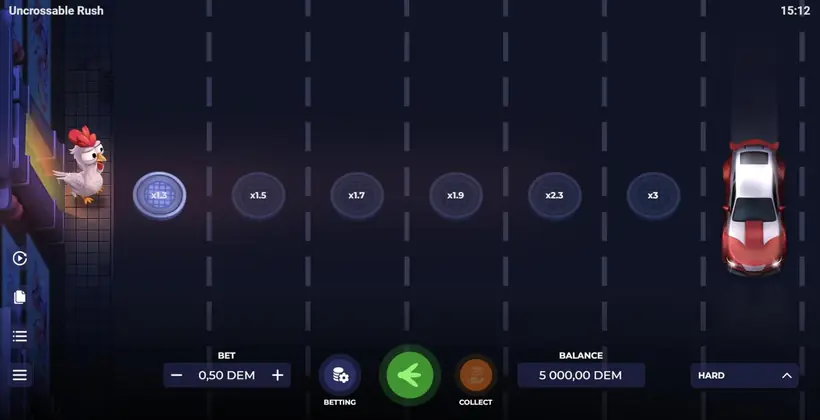
Our demo test on 2 November 2026 used Hard difficulty and a 0.50 DEM bet for all three rounds. The results below show the displayed outcomes, not a pattern for predicting later rounds.
Round one: hit on the first lane
A car hit Eggwina on the first lane. The balance moved from 5,000.00 DEM to 4,999.50 DEM, reflecting the lost 0.50 DEM bet. There was no successful step to collect from in this round.
Round two: hit after x1.3
Eggwina cleared the x1.3 lane, then a car hit her on the next move. The screen displayed the missed amount, 0.65 DEM, in red. That figure reflects 0.50 DEM multiplied by x1.3; it was not credited because the round ended on the collision.
Round three: collect at x1.7
Three safe steps took Eggwina to x1.7. We pressed COLLECT, and the button showed “COLLECT 0.85”: 0.50 DEM multiplied by x1.7. After all three rounds, the displayed balance was 4,999.85 DEM. The first two losses totalled 1.00 DEM and the third round returned 0.85 DEM, leaving the balance 0.15 DEM below its starting amount.
05 · Demo
Read the first lanes by difficulty
The first visible lane multipliers in the demo were different for each setting. This is useful for comparing the displayed progression before you choose a level, but it does not tell you which lane will be safe.
| Difficulty | First visible lane multipliers |
|---|---|
| Easy | x1.1, x1.2, x1.3, x1.4, x1.5, x1.6, x1.7 |
| Medium | x1.2, x1.4, x1.6, x1.8, x2, x2.2, x2.4 |
| Hard | x1.3, x1.5, x1.7, x1.9, x2.3, x3, x4 |
| Hardcore | x1.6, x1.8, x2.2, x3.5, x5, x20, x50 |
All four levels have 24 lanes and their own collision frequency. Higher difficulty brings faster and more cars, greater collision risk and a higher starting multiplier. The full paytable continues beyond the first lanes, reaching x24 on Easy, x2,500 on Medium, x5,000 on Hard and x10,000 on Hardcore. The values describe possible multipliers, not a forecast of a round’s outcome.
06 · Demo
Understand the board after COLLECT
After the third test round’s collect, the board showed the amounts that the next lanes would have paid: 0.95 DEM at x1.9, 1.5 DEM at x3 and 2 DEM at x4. These figures are based on the 0.50 DEM bet multiplied by those displayed values. They appeared after the collect as a view of what lay ahead, not as a hint about safe lanes or a way to recover a previous loss.
A collect ends your opportunity to continue that round. The later amounts were not part of the 0.85 DEM already collected, and the next round is a new outcome. The game rules state that outcomes are random and equally likely for all positions, using a random number generator. The guide to multipliers can help you read the paytable, but it cannot identify a safe next move.
07 · Demo
Set autoplay in the demo
The autoplay panel lets you configure repeated bets, but it does not change how the game decides a round. In the Rules screen, the available settings were Number of Bets, Bet Amount, Stop on Profit, Stop on Loss, On Win, On Loss and Cash Out on Win, followed by Start autoplay.
Choose settings before starting
On Win and On Loss can be set to Return to base, Increase or Decrease by a preset amount. Cash Out on Win uses a target coefficient that depends on the selected difficulty. Set the number of bets, amount and stop conditions first, then select Start autoplay. Review the values before starting because autoplay repeats rounds according to those settings; it is not a prediction tool or a method for ensuring a return.
If you want to see how the game fits into a mobile setup, read our app guide. Uncrossable Rush is an HTML5 game that runs in a mobile browser on an operator site or inside an operator app. No standalone Evoplay Uncrossable Rush app was found; an APK file from an unknown source is not the same thing as the game loading in a browser.
08 · Demo
Know what the demo shows and does not
The demo lets you practise the controls, view the difficulty dropdown, inspect the paytable and see a round’s displayed result. Its 5,000.00 DEM balance and bet amounts are test credits and do not establish what an operator’s version, currency, account or limits will be.
Separate game, operator and device
Evoplay develops and provides the game. A gaming operator hosts a version and handles its own account and other services. A mobile browser or operator app is simply how you may access a game hosted there; it is not an Evoplay game account. The real-or-fake guide covers misleading predictor and APK claims. The in-game rules also say a malfunction voids all pays and plays, and that certain features may not be available in all regions.
Demo availability can depend on location. In our cloud test, the Evoplay demo server was unavailable because of regional access restrictions. If the demo does not open, that can be a location or loading issue; it does not mean you should use a different file or try to bypass a restriction. The game’s Rules screen showed version 0.95.0 and a rules date of 05.03.2024 during the test.
09 · Demo
Fix common demo mistakes
The most common avoidable errors are starting before checking the level and bet, confusing a displayed future amount with a collected return, and treating a demo balance as cash. Before each round, confirm the difficulty dropdown and BET amount; after a safe step, read the COLLECT figure rather than assuming that continuing will preserve it.
Do not read the red 0.65 DEM from our second test as a payout: it marked the amount missed when the car ended the round. Likewise, the 0.95 DEM, 1.5 DEM and 2 DEM shown after the third collect were later-lane values, not extra credits. Use History to review round records. Its validation string can be pasted into a SHA-256 hash generator and compared with the round hash; this checks the string, not a future outcome.
10 · Demo
Choose your next step
Use the demo to learn the board and controls at your own pace. If you need the basic sequence again, visit the gameplay guide; if you are looking for a version hosted by an operator, the where-to-play page explains the distinction. Buttons marked Play, Register or Get bonus on this site lead via /go/ to a partner site, and the site may earn a commission. This guide is maintained by the Uncrossable Rush SlotIn editorial desk; contact the team at contact@uncrossablerush-slotin.com.
The demo itself has no bonus round, free spins or bonus symbols. Any promotion belongs to an operator and follows that operator’s terms. Staking real money on the game online is prohibited in India under the 2025 Act from 1 May 2026; the DEM demo involves no stake.
FAQ
Free demo questions
Is the Uncrossable Rush demo free to play?
Yes. The demo on this page is free, needs no sign-up and starts with 5,000 DEM credits that have no cash value.
How do I play the Uncrossable Rush game demo?
Press Play, choose a difficulty, set a bet, then press the green arrow. After each safe step, collect or continue.
Can I play Uncrossable Rush free on my phone?
Yes, the HTML5 game can run in a mobile browser when available. An operator app may also host it; no standalone Evoplay app was found.
What are the Uncrossable Rush demo limits?
The tested demo showed a 0.50 DEM default bet, with a 0.1 DEM minimum and 2,000 DEM maximum in Bet Settings.
Why might the Uncrossable Rush demo not open in India?
Demo availability can vary by region. In our cloud test, regional access restrictions prevented the Evoplay demo server from opening.